15. Modelling convenience
*Include
The *INCLUDE command inserts an external text file. It is used to manage complexity in input files.
*Include, File=file, [P=parameters]
Keyword line
- File=file: file name
- parameters: parameter expression. Must be enclosed in double quotes (
"), but this is optional.
Example
*INCLUDE, File=concrete.inp

*INCLUDE, File=model.inp, P="<S>=100. <T>=15.3, <Solver>={A,10}"
*Parameter
Defines a parameter expression.
*Parameter, Name=name, "key=val, ..." [,Default]
Keyword line
- Name=name: Name of the parameter expression
- "key=value, ...": Parameter expression, enclosed in double quotation marks (" ").
- Default: If specified, designates this parameter expression as the default (optional).
The name of a *Parameter expression must be unique and cannot be duplicated.
When multiple *Parameter statements are present, Default can be used only once.
Additionally, the *Parameter statement can only appear in the top-level input file
—it is not allowed within included files (e.g., those added via *Include).
The parameter expression must be enclosed in double quotation marks ("") and written in the form key=value, ..... When applied, each key is replaced with the corresponding value.
To avoid accidental replacement of unintended substrings, it is recommended to enclose the parameter key using characters that are not commonly used in normal text—such as <A> or $A$. For example, in "<E>=20E9, <B>=7.3", <E> is replaced with 20E9, and <B> with 7.3. Also, tokens inside a parameter expression may be grouped using braces {}. For example, in "<K>={R,12.3}, <B>=7.3", <K> is replaced with R,12.3.
For more details on the use of parameter expressions, refer to the overview section.
Example
*Parameter, Name=VM, "<E>=2E9, <nu>=0.18", Default
*Parameter, Name=CM, "<E>=2E9, <nu>=0.18"

*Material, TYPE=IsoElasticity, Name=myMat
 <E>, <nu>
*Distribution
Assigns properties to nodes or elements.
*Distribution, Type=type
  target, ...
  ...
Keyword line
-
Type=type: Type of distribution (required)
- Section: Specify or release the cross-section of elements
- BeamCS: Specify or release ECS for beam elements
- BeamEndRelease: Specify or release moment end release for beam elements
- EmbeddedLineSpline: Specify or release the spline for EmbeddedLine elements
- EmbeddedLineHostElset: Specify or release the parent elset for EmbeddedLine elements
- MCKElementScaleFactor: Specifies or releases the ScaleFactor for Spring, EarthSpring, and PointMass elements
- MCKElementCS: Specifies or releases the ECS (Element Coordinate System) for Spring, EarthSpring, and PointMass elements
- MovingSpringInitialPosition: Specify or release the initial position of moving springs
*Distribution, Type=Section
Specifies or releases the cross-sectional material properties of elements.
*Distribution, TYPE=Section
  target1,target2,..., section
  ...
First data line and subsequent data lines
- target1,target2,...: Element numbers, elsets, or element number patterns to specify the cross-sectional properties (required). Element number patterns follow the format
start:end:spacing, wherespacingcan be omitted if it is 1. - section: Section name (required)
Cross-sectional properties can be specified in *Element, but if omitted, they can also be specified using *Distribution, TYPE=Section. This command also allows for the deletion of already specified sections.
In the program, if there are two or more tokens in a line, it first checks whether the last token is a section; if not, it recognizes that the given section does not exist. If a section does not exist, the section already assigned to the target elements will be released. If you want to delete a section for an elset with the same name, only the elset should be listed on one line.
When specifying the target using element number patterns, non-existent elements are simply ignored and do not trigger an error.
Example
*Distribution, TYPE=Section
 left, section1    # Assign section "section1" to elset "left"
 right, middle, section2 # Assign section "section2" to elsets "right" and "middle"
 1,2,3,4, section3 # Assign section "section3" to elements 1, 2, 3, and 4
 2:10    # Remove the previously assigned section from elements 2 through 10
*Distribution, Type=BeamCS
Specifies or releases the ECS (Element Coordinate System) for three-dimensional beam elements.
*Distribution, Type=BeamCS
  target1,target2, ..., beamcs
  ...
First data line and subsequent data lines
- target1,target2,...: Element numbers, elsets, or element number patterns to which the element coordinate system (ECS) is applied (required). Element number patterns follow the format
start:end:spacing, wherespacingcan be omitted if it is 1. This is only valid for three-dimensional beam elements. - beamcs: Beam's ECS (optional)
This command is only valid when the target elements are three-dimensional beam elements. In the program, if there are two or more tokens in a line, it first checks whether the last token is BeamCS. If it is not, the given beamcs is recognized as non-existent. If a beamcs does not exist, the beamcs already assigned to the target elements will be released. If you want to delete a beamcs for an elset with the same name, only the elset should be listed on one line.
When specifying the target using element number patterns, non-existent elements are simply ignored and do not trigger an error.
Example
*CoordinateSystem, Type=BeamCS, Name=beamcs
 90

*Distribution, Type=BeamCS
 1, 2, 3, beamcs
 beamSet, beamcs
 beamSet2, beamSet3, beamcs
 beamset1, 1:10      # release
*Distribution, Type=BeamEndRelease
Specifies or releases the end-release conditions for beam elements.
*Distribution, Type=BeamEndRelease
  target1,target2, ..., releaseCode
  ...
First data line and subsequent data lines
- target1,target2,...: Element numbers, elsets, or element number patterns to which the end-release conditions are applied (required). Element number patterns follow the format
start:end:spacing, wherespacingcan be omitted if it is 1. This is only valid for beam elements. - releaseCode: End release code for the beam element (optional). This can be a combination of Rx1, Ry1, Rz1, Rx2, Ry2, Rz2. For example, Rz1|Rz2.
For two-dimensional beam elements, only Rz1 and Rz2 are valid. If no releaseCode is provided, any previously specified end release code will be released.
When specifying the target using element number patterns, non-existent elements are simply ignored and do not trigger an error.
Example
*Distribution, Type=BeamEndRelease
 1, 2, 3, Rz1|Rz2
 beamSet, Rx1|Ry1|Rz1
 1:10    # Releases all end release codes for elements 1 through 10.
*Distribution, Type=EmbeddedLineSpline
Specifies or releases the spline for EmbeddedLine elements.
*Distribution, Type=EmbeddedLineSpline
  target1,target2, ..., spline
  ...
First data line and subsequent data lines
- target: Element numbers, elsets, or element number patterns to which the host element is applied (required). Element number patterns follow the format
start:end:spacing, wherespacingcan be omitted if it is 1. This is only valid for EmbeddedLine elements. - spline: Splie (optional).
If no spline is provided, the host is removed from the specified elements. In the program, if there are two or more tokens in a line, it first checks whether the last token is a spline. If it is not (i.e., based on whether it is an EmbeddedLine element), the given hostElset is recognized as non-existent. If no spline exists, any spline already assigned to the target elements will be released.
When specifying the target using element number patterns, non-existent elements are simply ignored and do not trigger an error.
Example
*Distribution, Type=EmbeddedLineSpline
 1,2,3, curve1
 tendonSet, curve2
 tendonSet1,tendonSet2, curve3
 tendonSet  # release
*Distribution, Type=EmbeddedLineHostElset
Specifies or releases the host elset for EmbeddedLine elements.
*Distribution, Type=EmbeddedLineHostElset
  target1,target2, ..., hostElset
  ...
First data line and subsequent data lines
- target: Element numbers, elsets, or element number patterns to which the host element is applied (required). Element number patterns follow the format
start:end:spacing, wherespacingcan be omitted if it is 1. This is only valid for EmbeddedLine elements. - hostElset: Host elset (optional).
If no hostElset is provided, the host is removed from the specified elements. In the program, if there are two or more tokens in a line, it first checks whether the last token is a hostElset. If it is not (i.e., based on whether it is an EmbeddedLine element), the given hostElset is recognized as non-existent. If no hostElset exists, any hostElset already assigned to the target elements will be released.
When specifying the target using element number patterns, non-existent elements are simply ignored and do not trigger an error.
Example
*Distribution, Type=EmbeddedLineHostElset
 1,2,3, girder
 tendonSet, crossbeam
 tendonSet1,tendonSet2, mainGirder
 tendonSet  # release
*Distribution, Type=MCKElementScaleFactor
Specifies or releases the ScaleFactor for Spring, EarthSpring, and PointMass elements.
*Distribution, Type=MCKElementScaleFactor
  target1,target2, ..., sf
  ...
First data line and subsequent data lines
- target1,target2,...: Element numbers, elsets, or element number patterns to which the ScaleFactor will be applied (required). Element number patterns follow the format
start:end:spacing, wherespacingcan be omitted if it is 1. This is only valid for Spring, EarthSpring, and PointMass elements. - sf: Scale factor
Specifies an additional scale factor for Spring, EarthSpring, and PointMass elements. If the target elements do not exist or are not of type Spring, EarthSpring, or PointMass, they are simply ignored and do not trigger an error.
Example
*Distribution, Type=MCKElementScaleFactor
 1, 2, 3, 2.5    # Set a scale factor of 2.5 for elements 1, 2, and 3.
 wall, 2.5       # Specify a scale factor of 2.5 for the wall elset (which must consist entirely of spring elements).
*Distribution, Type=MCKElementCS
Specifies or releases the ECS (Element Coordinate System) for Spring, EarthSpring, and PointMass elements.
*Distribution, Type=MCKElementCS
  target1,target2, ..., ucs
  ...
First data line and subsequent data lines
- target1,target2,...: Element numbers, elsets, or element number patterns to which the ECS will be applied (required). Element number patterns follow the format
start:end:spacing, wherespacingcan be omitted if it is 1. This is only valid for Spring, EarthSpring, and PointMass elements. - ucs: User Coordinate System (UCS) to be used for the spring elements (optional).
This command is valid only for elements that are Spring, EarthSpring, or PointMass. In the program, if there are two or more tokens in a line, it first checks whether the last token is a CS. If it is not, the given CS is recognized as non-existent. If no CS exists, any previously assigned CS to the target elements will be released. If you want to delete a CS for an elset with the same name, only the elset should be listed on one line. If the target elements do not exist or are not of type Spring, EarthSpring, or PointMass, they are simply ignored and do not trigger an error.
Example
*CoordinateSystem, Type=UCS, Name=springCS
 1, 1, 0, 0, 1, 0

*Distribution, Type=MCKElementCS
 1, 2, 3, springCS
 springSet, springCS
 springSet2,  springSet3, springCS
 springSet   # Release
*Distribution, Type=MovingSpringInitialPosition
Specifies or releases the initial position of the moving spring.
*Distribution, Type=MovingSpringIntialPosition
  target, x, y
  ...
First data line and subsequent data lines
- target: Element numbers, elsets, or element number patterns to specify the initial position of the moving spring (required). Element number patterns follow the format
start:end:spacing, wherespacingcan be omitted if it is 1. This is only valid for MovingSpring elements. - P=x,y: Initial position (optional; default: 0,0). For moving springs targeting beam elements, only the x value is referenced.
The moving spring element (*Element, Type=MovingSpring) specifies its initial position (default: 0,0 if not specified). If the target elements do not exist or are not of type MovingSpring, they are simply ignored and do not trigger an error.
Example
*Distribution, Type=MovingSpringIntialPosition
 100, -5, 0.    # Apply the initial position of (-5, 0) to element 100.
*Model
Generates a pre-defined template model.
*Model, Type=type
  ...
Keyword line
-
Type=type: Type of model (required)
- Block2D: Generates a rectangular mesh using 2D solid elements
- Block3D: Generates a rectangular mesh using 3D solid elements
- Cylinder: Generates a cylinder mesh using 3D solid elements
- Wall: Generates a rectangular mesh using shell elements
- RectangularTank: Generates a rectangular tank mesh using shell elements
- CylindericalTank: Generates a cylinderical tank mesh using shell elements
- CurveExtrusion: Generate a shell-element mesh by extruding a 2D cross-section curve along a spline path
- FarField2D: Generates a 2D mesh for SSI analysis and creates equivalent loads from the results of free field analysis
- FarField3D: Generates a 3D mesh for SSI analysis and creates equivalent loads from the results of free field analysis
*Model, Type=Block2D
Generates a rectangular mesh using 2D solid elements.
*Model, Type=Block2D
 name, startNodeId, startElementId, elementType, section
 x1, x2, ..., x{n+1}, nx1, nx2, ..., nx{n}
 y1, y2, ..., y{n+1}, ny1, ny2, ..., ny{n}
 ix1, iy1, ...
First data line
- name: Representative name. This name serves as the basis for naming nsets, elsets, surfaces, loads, etc., created by this command.
- startNodeId, startElementId: Starting node and element numbers. Use "Auto" for automatic calculation.
- elementType: Type of element to apply, such as CPS4, AC2D4, etc., for 2D rectangular solid elements.
- section: Section to apply (optional; if omitted, no section is applied to the elements).
Second and third data lines
- x1, x2, ..., x{n+1}, nx1, nx2, ..., nx{n}: x range and number of elements.
- y1, y2, ..., y{n+1}, ny1, ny2, ..., ny{n}: y range and number of elements.
Fourth data line (optional)
- ix, iy, ...: Block numbers to be deleted (ix, iy).
This command generates entities such as nsets, elsets, and surfaces in addition to nodes and elements.
- Nset:
name(all nodes) - Elset:
name(all elements) - Surface:
name(all outer surfaces),name-NX(surface where X=xmin),name-PX(surface where X=xmax),name-NY(surface where Y=ymin),name-PY(surface where Y=ymax). If there are blocks to be deleted, surfaces adjacent to the deleted regions are created asname-i-j-PX,name-i-j-NX,name-i-j-PY,name-i-j-NY, where i and j are the numbers of the deleted regions.
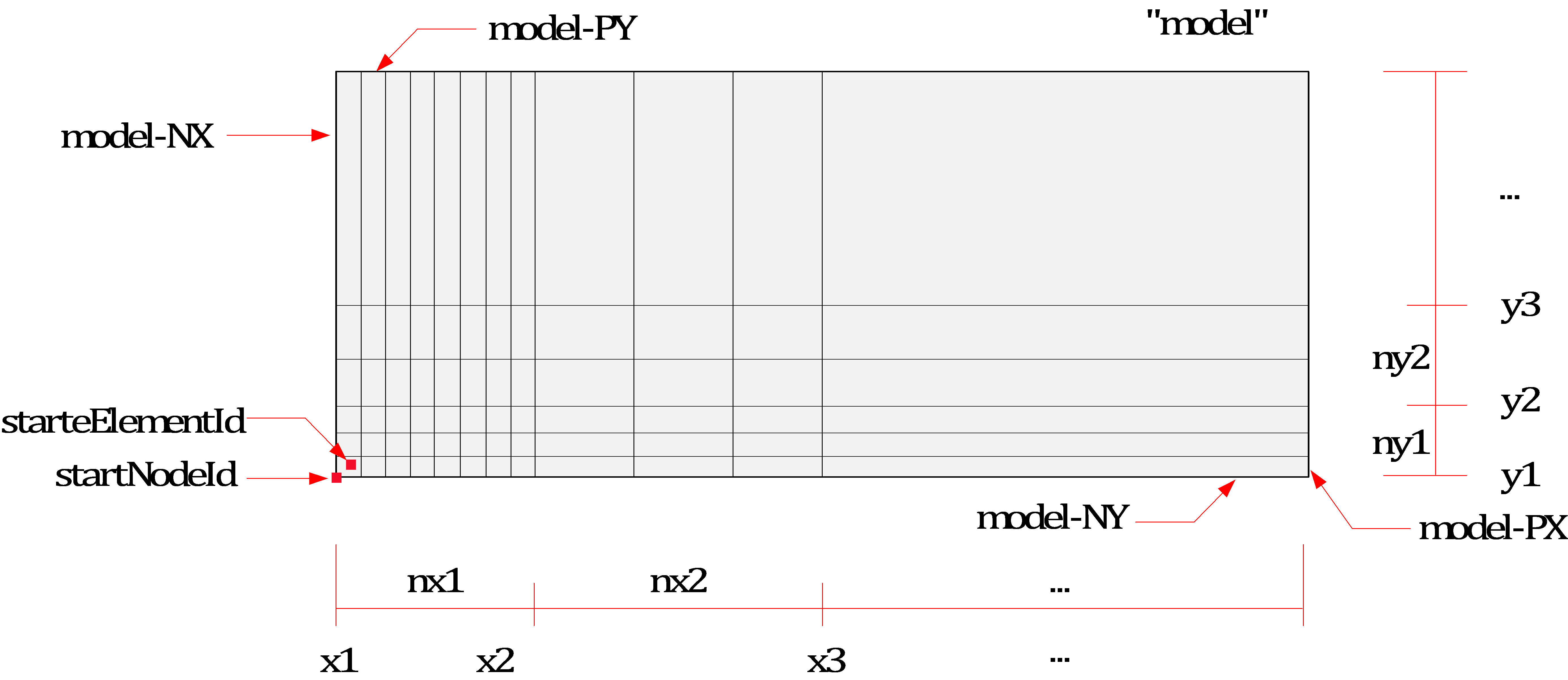
Fig. 15.5-1. Block2D mesh generation
Example
*Material, Type=IsoElasticity, Name=steel
 2E6, 0.2

*Section, Type=Solid, Name=solid
 steel, 0.1

*Model, TYPE=Block2D
 Cant, 1, 1, CPS4, solid    # Generate elements with solid section
 0, 20, 10
 0, 4, 4

*Model, TYPE=Block2D
 CantX, Auto, Auto, CPS4    # Generate elements without section
 0, 20, 10
 0, 4, 4
*Model, Type=Block3D
Generates a rectangular mesh using 3D solid elements.
*Model, Type=Block3D
 name, startNodeId, startElementId, elementType, section
 x1, x2, ..., x{n+1}, nx1, nx2, ..., nx{n}
 y1, y2, ..., y{n+1}, ny1, ny2, ..., ny{n}
 z1, z2, ..., z{n+1}, nz1, nz2, ..., nz{n}
 ix, iy, iz, ...
First data line
- name: Representative name. This name serves as the basis for naming nsets, elsets, surfaces, loads, etc., created by this command.
- startNodeId, startElementId: Starting node and element numbers. Use "Auto" for automatic calculation.
- elementType: Type of element to apply, such as C3D8, AC3D8, etc., for 3D hexahedral solid elements.
- section: Section to apply (optional; if omitted, no section is applied to the elements).
Second, third, and fourth data lines
- x1, x2, ..., x{n+1}, nx1, nx2, ..., nx{n}: x range and number of elements.
- y1, y2, ..., y{n+1}, ny1, ny2, ..., ny{n}: y range and number of elements.
- z1, z2, ..., z{n+1}, nz1, nz2, ..., nz{n}: z range and number of elements.
First data line for deletion
- ix, iy, iz, ...: Block numbers to be deleted (ix, iy, iz).
This command generates entities such as nsets, elsets, and surfaces in addition to nodes and elements.
- Nset:
name(all nodes) - Elset:
name(all elements) - Surface:
name(all outer surfaces),name-NX(surface where X=-xmin),name-PX(surface where X=xmax),name-NY(surface where Y=ymin),name-PY(surface where Y=ymax),name-NZ(surface where Z=zmin),name-PZ(surface where Z=zmax), If there are blocks to be deleted, surfaces adjacent to the deleted regions are created asname-i-j-k-PX,name-i-j-k-NX,name-i-j-k-PY,name-i-j-k-NY,name-i-j-k-NZ,name-i-j-k-PZ, where i, j, and k are the numbers of the deleted regions.
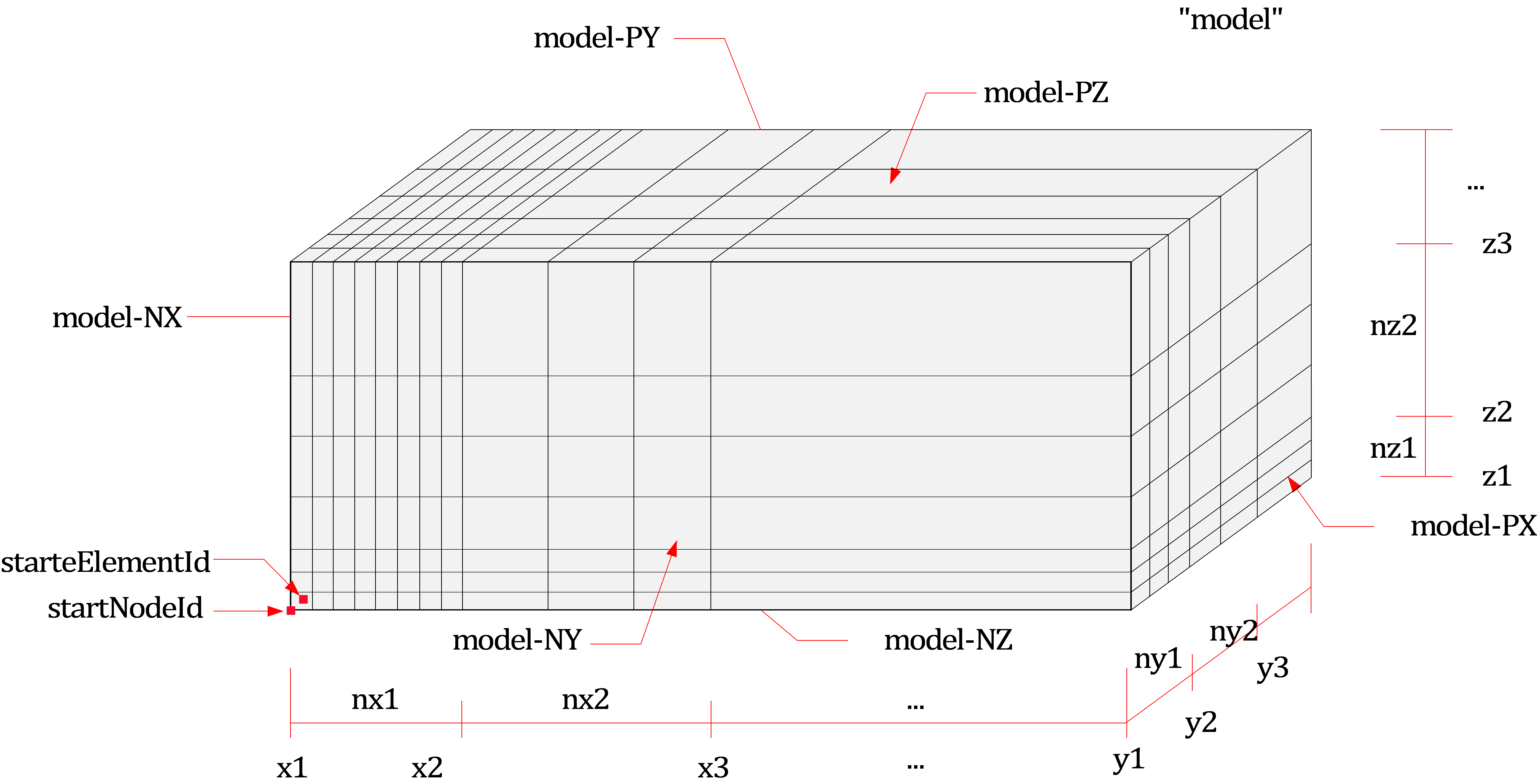
Fig. 15.5-2. Block3D mesh generation
Example
*Material, Type=IsoElasticity, Name=steel
 2E6, 0.2

*Section, Type=Solid, Name=solid
 steel, 1

*Model, TYPE=Block3D
 Cant, 1, 1, C3D8, solid  # Generate elements with solid section
 0, 20, 10
 0, 4, 4
 0, 2, 2

*Model, TYPE=Block3D
 Cant, Auto, Auto, C3D8    # Generate elements without section
 0, 20, 10
 0, 4, 4
 0, 2, 2
*Model, Type=Cylinder
Creates a cylindrical mesh.
*Model, Type=Cylinder
 name, startNodeId, startElementId, elementType, section
 x0, y0, z0, R, nseg
 h1, h2, ..., h{n}, nh1, nh2, ... nh{n}
First data line
- name: Representative name used as the base name for entities like nsets, elsets, surfaces, and loads created by this command.
- __startNodeId, startElementId __: Starting node and element IDs. Use "Auto" for automatic calculation.
- elementType: Type of the element to apply, such as 3D hexahedral solid elements like C3D8, AC3D8.
- section: Section to be applied (optional; if omitted, no section is applied to the elements).
Second data line
- x0, x0, z0: Origin coordinates.
- R: Radius in the xy-plane.
- nseg: No. of segments in the perimeter of quarter outer circle. If nseg is less than 4, 4 is used. (optional, default 0)
Third data line
- h1, h2, ... h{n}, nh1, nh2, ..., nh: Heights in the z-direction and the number of elements along each height.
In addition to nodes and elements, the command generates other entities like nsets, elsets, and surfaces:
- Nset : name (all nodes)
- Elset : name (all elements)
- Surface : name (all outer surfaces), name-Top(top surface), name-Bottom(bottom surface), name-Side(side surface)
Example
*Material, Type=Acoustic, Name=Water
 2190.4E+6, 1000   # bulkModulus, density  ... compressible

*Section, Type=Solid, Name=Water
 Water, 1   # thickness


*Model, TYPE=Cylinder
 Water, auto, auto, AC3D8, Water
 0,0,0,18.3,4  # x0, y0, z0, R, nseg
 12.2,5         # h1,...,nh1,...
*Model, Type=Wall
Generates a rectangular mesh using shell elements.
*Model, Type=Wall
 name, startNodeId, startElementId, elementType, section
 ox, oy, oz, x1, x2, x3, y1, y2, y3
 lxmin, lxmax, nlx
 lymin, lymax, nly
- name: Representative name. This name serves as the basis for naming nsets, elsets, surfaces, loads, etc., created by this command.
- startNodeId, startElementId: Starting node and element numbers. Use "Auto" for automatic calculation.
- elementType: Type of element to apply, such as 4-node shell elements (S4, S4F, etc.) or 8-node solid shells (CS8).
- section: Section to apply (optional; if omitted, no section is applied to the elements).
Second data line
- ox, oy, oz: Reference point of the local coordinate system.
- x1, x2, x3: Defines the x-axis of the local coordinate system.
- y1, y2, y3: Another vector defining the plane of the local coordinate system. The y-axis is created as y = x × z.
Third and fourth data lines
- lx1min, lxmax, nlx: Range and number of elements for the first axis (local x) in the local coordinate system.
- lymin, lymax, nly: Range and number of elements for the second axis (local y) in the local coordinate system.
This command generates entities such as nsets and elsets in addition to nodes and elements.
- Nset:
name(all nodes) - Elset:
name(all elements)
When applying CS8 elements, a single layer of solid shell is created based on shell thickness. If no shell section is provided, a thickness of 1 is applied.
Example
*Material, Type=IsoElasticity, Name=steel
 2E6, 0.2

*Section, Type=Shell, Name=beam
 steel, 0.1

*Model, Type=Wall
 beam, Auto, Auto, S4, beam
 0,  0,  0, 1, 0, 0, 0, 1, 0
 0, 20, 20
 0, 4, 4
*Model, Type=RectangularTank
Generates a rectangular tank mesh using shell elements with an open top surface.
*Model, Type=RectangularTank
 name, startNodeId, startElementId, elementType, wallSection, bottomSection
 x1, x2, ..., x{n+1}, nx1, nx2, ..., nx{n}
 y1, y2, ..., y{n+1}, ny1, ny2, ..., ny{n}
 z1, z2, ..., z{n+1}, nz1, nz2, ..., nz{n}
First data line
- name: Representative name. This name serves as the basis for naming nsets, elsets, surfaces, loads, etc., created by this command.
- startNodeId, startElementId: Starting node and element numbers. Use "Auto" for automatic calculation.
- elementType: Type of element to apply, such as S4F for rectangular shell elements.
- wallSection, bottomSection: Sections for the wall and bottom surfaces (optional; if omitted, no section is applied to the elements).
Second, third, and fourth data lines
- x1, x2, ..., x{n+1}, nx1, nx2, ..., nx{n}: x range and number of elements.
- y1, y2, ..., y{n+1}, ny1, ny2, ..., ny{n}: y range and number of elements.
- z1, z2, ..., z{n+1}, nz1, nz2, ..., nz{n}: z range and number of elements.
This command generates entities such as nsets, elsets, and surfaces in addition to nodes and elements.
- Nset:
name(all nodes) - Elset:
name(all elements) - Surface:
name(all outer surfaces),name-NX(surface where X=-xmin),name-PX(surface where X=xmax),name-NY(surface where Y=ymin),name-PY(surface where Y=ymax),name-Bottom(surface where Z=zmin)
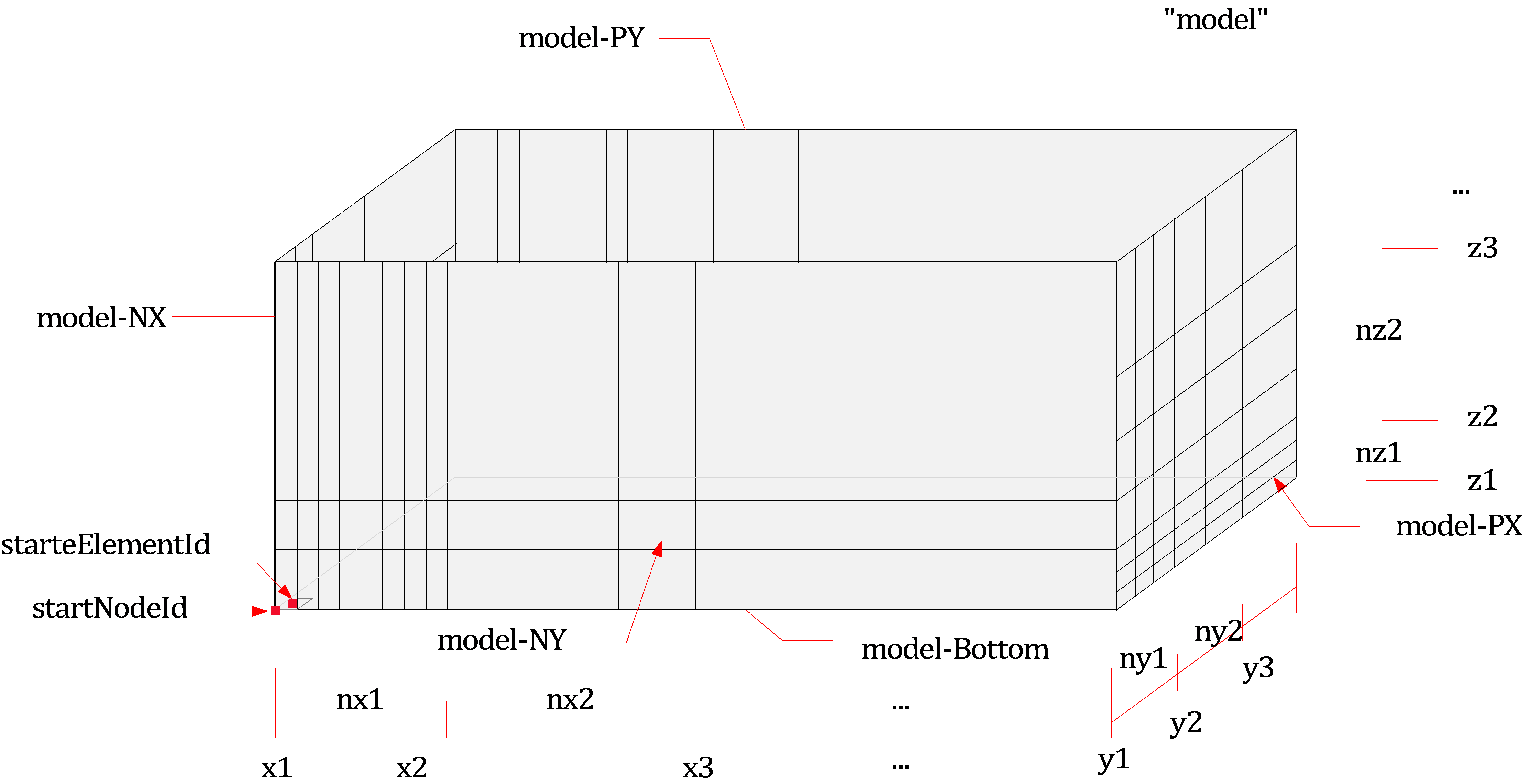
Fig. 15.5-3. RectangularTank mesh generation
Example
*Material,Type=IsoElasticity,Name=mat
 30E9, 0.18, 0, 2000.    # E, nu, alpha, density

*Section, Type=Shell, Name=shell
 mat, 0.01     # h

*Model, TYPE=RectangularTank
 Cant, 1, 1, S4F, shell, shell
 0, 20, 10
 0, 4, 4
 0, 2, 2


*Model, TYPE=RectangularTank
 CantX, Auto, Auto, S4F      # Generate elements without section
 0, 20, 10
 0, 4, 4
 0, 2, 2
*Model, Type=CylindericalTank
Creates a cylindrical tank mesh with an open top using shell elements.
*Model, Type=CylindericalTank
 name, startNodeId, startElementId, elementType, wallSection, bottomSection
 x0, y0, z0, R, nseg
 h1, h2, ..., h{n}, nh1, nh2, ... nh{n}
First data line
- name: Representative name used as the base name for entities like nsets, elsets, surfaces, and loads created by this command.
- __startNodeId, startElementId __: Starting node and element IDs. Use "Auto" for automatic calculation.
- elementType: Type of the element to apply, such as rectangular shell elements like S4F.
- wallSection, bottomSection: Sections for the wall and bottom (optional; if omitted, no section is applied to the elements).
Second data line
- x0, x0, z0: Origin coordinates.
- R: Radius in the xy-plane.
- nseg: No. of segments in the perimeter of quarter outer circle. If nseg is less than 4, 4 is used. (optional, default 0)
Third data line
- h1, h2, ... h{n}, nh1, nh2, ..., nh: Heights in the z-direction and the number of elements along each height.
In addition to nodes and elements, the command generates other entities like nsets, elsets, and surfaces:
- Nset : name (all nodes)
- Elset : name (all elements)
- Surface : name (all outer surfaces), name-Bottom(bottom surface), name-Side(side surface)
Example
*Material, Type=IsoElasticity, Name=Tank
 2.0776E+10, 0.17, 0, 2300   # E(MPa), nu, alpha, density

*Section, Type=Shell, Name=Tank
 Tank, 1.2

*Model, TYPE=CylindericalTank
 Tank, auto, auto, S4F, Tank, Tank
 0,0,0,18.3,4  # x0, y0, z0, R, nseg
 12.2,1.8,5,2  # h1,...,nh1,...
*Model, Type=CurveExtrusion
Generate a shell-element mesh by extruding a 2D cross-section curve along a spline path.
*Model, Type=CurveExtrusion
 name, spline, nseg, startNodeId, startElementId, elementType, section
 x1,y1
 x2,x2
 ...
First data line
- name: Base name that will be used for automatically generating node sets, element sets, surfaces, loads, etc. created by this command
- spline: Reference spline curve used as the extrusion path
- nseg: Number of elements to generate along the extrusion direction
- startNodeId, Starting node and element IDs. If set to Auto, they are assigned automatically
- elementType: Element type to be used, e.g., S4F (4-node quadrilateral shell element)
- section: Optional. Section assigned to the generated elements (no assignment if omitted)
Second data line and subsequent data lines
- xi, yi: Coordinates of the 2D cross-section
The input 2D cross-section points (xi, yi) are connected in order to form the section geometry. This section is then swept along the spline path, generating an S4/S4F shell mesh. If the last point is identical to the first point, the section is treated as a closed loop, and the extrusion produces a cylindrical or tube-like curved shell mesh along the given path.
Each section point (xi, yi) is transformed into a 3D location using a local coordinate system defined at each point along the spline. The local basis is constructed as follows: the tangent vector of the spline defines ex; ey is computed from the cross product of ex and a predefined up vector; and ez = ex × ey, completing an orthogonal triad. The (ey, ez) plane becomes the placement plane for the 2D cross-section.
The default up vector is (0, 0, 1). However, when the tangent ex becomes nearly parallel to the global z-axis—causing the cross product to approach zero—the up vector is automatically switched to (0, 1, 0) to avoid singularities and maintain a stable section coordinate frame.
Example
*Construction, Type=Spline, Name=tunnelLine
  0,   0,  0
 10,   2,  1
 20,   3,  2
 30,   5,  3
 40,   4,  2
 50,   1,  1
 60,   0,  0

*Material, TYPE=IsoElasticity, Name=mat
 20E9

*Section, Type=Shell, Name=wall
 mat, 0.3

*Model, Type=CurveExtrusion
 testTunnel, tunnelLine, 100, Auto, Auto, S4F, wall
-4.800, 0.000
-4.900, 1.000
-5.000, 2.000
-5.000, 3.000
-5.000, 4.000
-4.924, 4.868
-4.698, 5.710
-4.330, 6.500
-3.830, 7.214
-3.213, 7.826
-2.500, 8.320
-1.710, 8.689
-0.868, 8.915
 0.000, 9.000
 0.868, 8.915
 1.710, 8.689
 2.500, 8.320
 3.213, 7.826
 3.830, 7.214
 4.330, 6.500
 4.698, 5.710
 4.924, 4.868
 5.000, 4.000
 5.000, 3.000
 5.000, 2.000
 4.900, 1.000
 4.800, 0.000
 4.000,-0.100
 3.000,-0.200
 2.000,-0.300
 1.000,-0.400
 0.000,-0.500
-1.000,-0.400
-2.000,-0.300
-3.000,-0.200
-4.000,-0.100
-4.800, 0.000
*Model, TYPE=FarField2D
Generates a 2D mesh for SSI (Soil-Structure Interaction) analysis, performs free field analysis, and calculates equivalent loads.
*Model, TYPE=FarField2D
 name, startNodeId, startElementId, outputFormat
 acceleration, iz, Direct|Outcrop, rcx, x0
 nearMinX, nearMaxX, nearMeshCountX, farMeshSizeX, farMeshCountX
 ytop
 E1, nu1, density1, xi1, h1, ny1
 E2, nu2, density2, xi2, h2, ny2
 ...
 En, nun, densityn, xin, hn, nyn
 {bottomNSet} | {EHalf, nuHalf, densityHalf, xiHalf, farMeshSizeY, farMeshCountY}
First data line
- name: Representative name. This name serves as the basis for naming nsets, elsets, surfaces, loads, etc., created by this command.
- startNodeId, startElementId: Starting node and element numbers. Use "Auto" for automatic calculation.
- outputFormat: Output time history file format for equivalent loads and ground motion at the bottom surface. Options are auto, csv, or npy. If "csv" is chosen, output will be in CSV format only; if "npy" is chosen, output will be in NPY format only. If "auto" is selected, it checks the number of columns in the generated function file: if 16,364 or fewer, it outputs as CSV; otherwise, it outputs as NPY. The default: "auto".
Second data line
- acceleration: Acceleration time history function. Must be a TimeSeries function with two components, corresponding to the acceleration in the X and Y directions.
- iz, Direct|Outcrop: Layer boundary number (1-based) where the time history is applied and the input method (if Direct, it treats the acceleration input as being at iz; if Outcrop, it treats it as outcrop motion).
izcan be specified up to(number of layers) + 1. However, if the base condition is rigid (Rigid) and specified as Outcrop, it can be specified only up to(number of layers)(to specify Outcrop, there must be underlying layer information). - rcx: Inverse of the horizontal apparent velocity of the incoming seismic wave. Calculated as
rcx = 1/cx, wherecx = cp/lx = cs/mx, withcpandcsbeing the P-wave and S-wave velocities, and(lx, ly, lz)and(mx, my, mz)being the unit direction vectors for P-waves and S-waves, respectively. The use ofrcxinstead ofcxis due to the fact that the direct cosinelxandmxare zero for vertically incident waves. - x0: Reference point for the incoming seismic wave.
Third data line
- nearMinX, nearMaxX, nearMeshCountX, farMeshSizeX, farMeshCountX: Range and number of elements for the near field in the X direction, size of the far field mesh, and number of elements.
Fourth data line
- ytop: Position of the ground surface.
- f0: Reference frequency (Hz). Applied when approximating using stiffness-proportional damping for effective load calculations (for single-layer ground, the first natural frequency is
vs/4H; for multi-layer ground, the equivalent accelerationvse = sum(Hi)/sum(Hi/Vsi)is calculated and then applied tovse/4H; damping ratio is set to 5% based on material damping).
Fifth data line and subsequent data lines
- E1, nu1, density1, xi1, h1, nz1: Material properties and height for the first layer of ground from the surface.
- E2, nu2, density2, xi2, h2, nz2: Material properties and height for the second layer of ground from the surface (optional).
- ...
- En, nun, densityn, xin, hn, nzn: Material properties and height for the nth layer of ground from the surface (optional).
Last data line
- bottomNset: Name of the nset at the base if rigid conditions are applied.
- EHalf, nuHalf, densityHalf, xiHalf, farMeshSizeY, farMeshCountY: Material properties for the bedrock under flexible conditions, and the size and number of elements for the far field in the Y direction.
The conditions can be set for either Rigid or Flexible based on whether the stiffness of the base is considered. The CPE4PMDL element is used for the SimplePMDL formulation to handle infinite regions, and a viscous boundary is set at the outer edge of the far field mesh. In addition to nodes and elements, entities such as the given name and bottomNset will generate:
- Materials:
name-1,name-2, ... (materials corresponding to layers),name-half(material corresponding to the half space). - Sections:
name-1,name-2, ... (sections corresponding to layers),name-half(section corresponding to the half space). - Elsets:
name(all elements),name-1,name-2, ... (elements corresponding to layers),name-half(elements corresponding to the half space). - Surfaces:
name-Boundary(outer boundary of the far field),name-NNX(near field-boundary where X=nearXMin),name-PX(near field-boundary where X=nearXMax),name-NY(near field-boundary where Y=ymin),name-PY(near field-boundary where Y=ymax),name-Bottom(near field-boundary where Z=zmin for flexible conditions). - Constraints:
name-Boundary(viscous boundary). - Loads:
name-Effective(equivalent loads),bottomNset-Motion(prescribed motion load for rigid conditions). - Functions:
name-Effective(time function used for effective loads),bottomNset-Motion(time function used for node motion in rigid conditions).
The generated time history files are:
<DB>-name-Freefield.csv|npy: Time history file for free field analysis results showing layer boundary responses in terms of displacement, velocity, and acceleration. This is for reference and not used in the analysis.<DB>-name-Effective.csv|npy: Time history file for effective loads acting at the near-field-far-field boundary.<DB>-bottomNset-Motion.csv|npy: Time history file storing prescribed motion in rigid conditions.
Here, <DB> refers to the input file name without the extension.
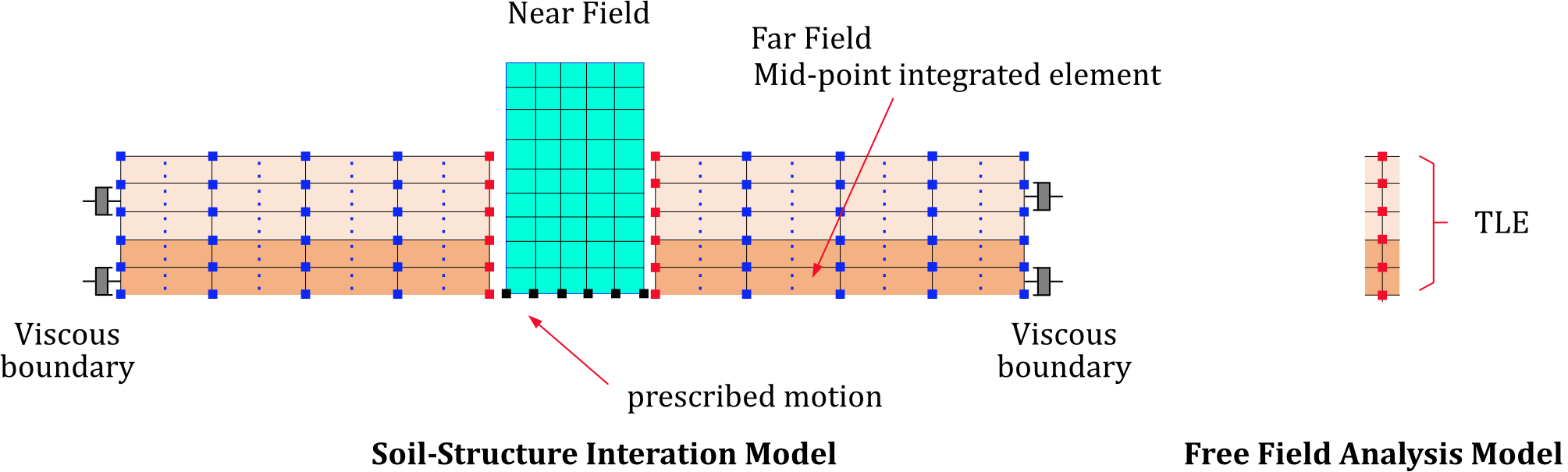
Fig. 15.5-4. Rigid case
Fig. 15.5-4. Rigid case
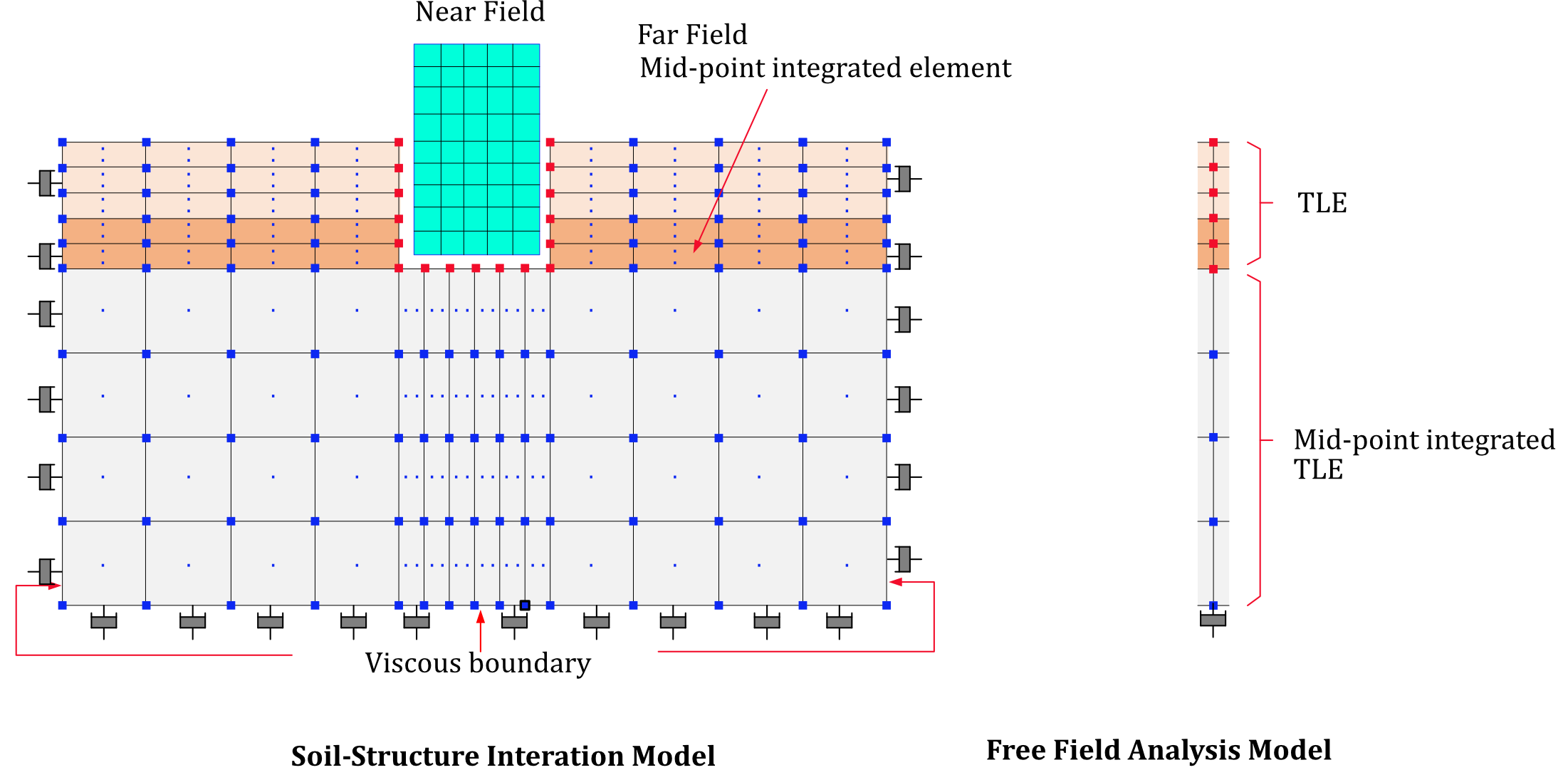
Fig. 15.5-5. Flexible case
Fig. 15.5-5. Flexible case
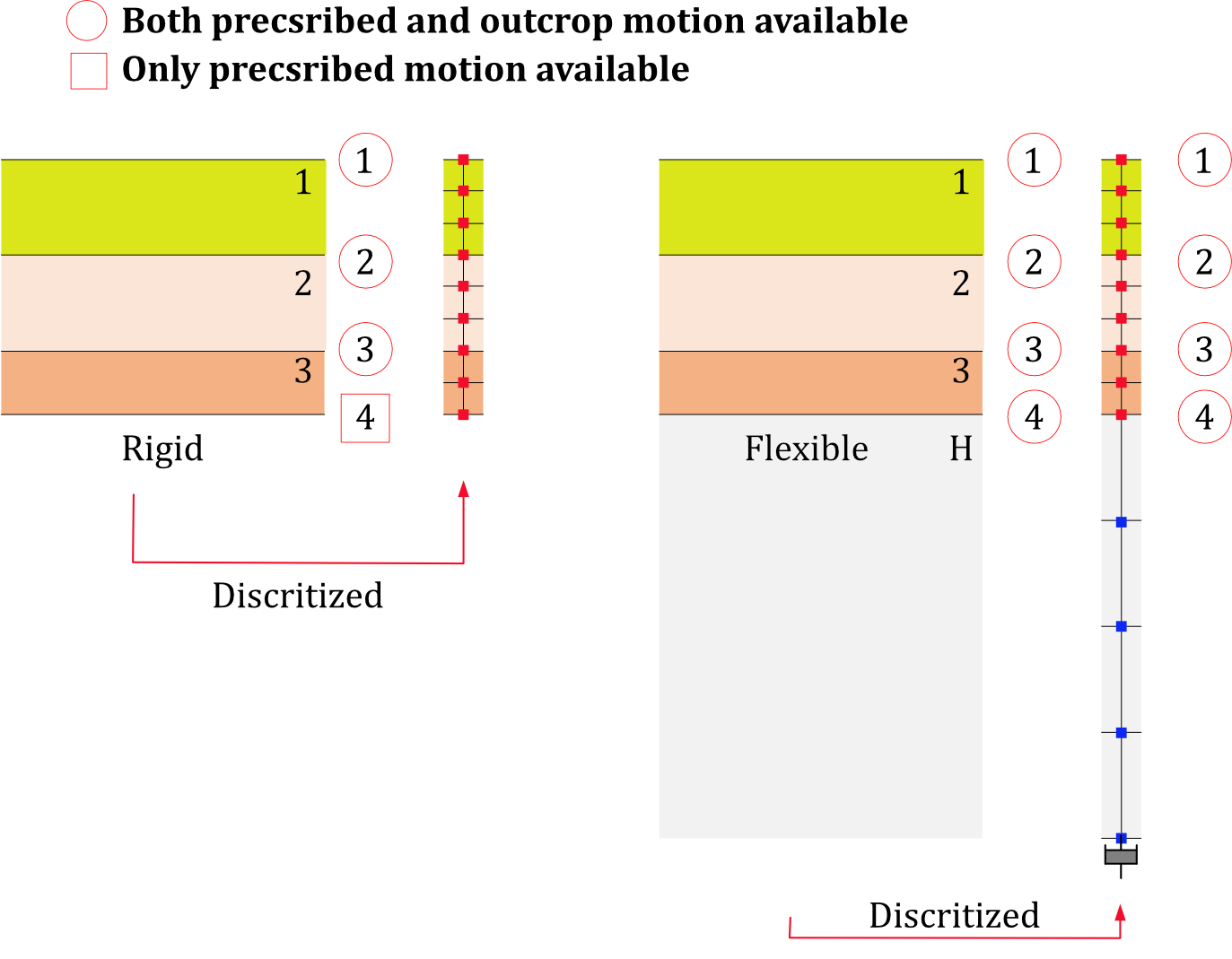
Fig. 15.5-6. Acceleration history input
Example
*Function, TYPE=TimeSignal, Name=acc
 0.02, 4096
 ELCchopra.dat, 1, 0.31*9.81
 ELCchopra.dat, 1, 0.31*9.81

*Node, NSet=Bottom
 1, -10, -30
 2,  10, -30
 3,  10, -30
 4, -10, -30

*Model, TYPE=FarField2D
 RigidBase2D, Auto, Auto
 acc, 3, Direct, 1/200, 0          # acc, iz, Direct|Outcrop, rcx, x0
  -10, 10, 1, 16, 10  # nearMinX, nearMaxX, nearMeshCountX,  farMeshSizeX, farMeshCountX
  0, 1.                    # ztop, f0
  20E9,0.2, 2000, 0.02, 10, 5      # E, nu, density, xi, h, nz
  25E9,0.2, 2000, 0.02, 20, 10      # E, nu, density, xi, h, nz
  Bottom

*Model, TYPE=FarField2D
 FlexibleBase2D, Auto, Auto
 acc, 3, Outcrop, 1/200, 0          # acc, iz, Direct|Outcrop, rcx, x0
  -10, 10, 1, 16, 10  # nearMinX, nearMaxX, nearMeshCountX,  farMeshSizeX, farMeshCountX
  0, 1.                    # ztop, f0
 20E9,0.2, 2000, 0.02, 10, 5      # E, nu, density, xi, h, nz
 25E9,0.2, 2000, 0.02, 20, 10      # E, nu, density, xi, h, nz
 30E9, 0.2, 2000, 0.02, 16, 10     # E, nu, density, xi, farMeshSizeZ, farMeshCountZ
*Model, TYPE=FarField3D
Generates a 3D mesh for SSI (Soil-Structure Interaction) analysis, performs free field analysis, and calculates equivalent loads.
*Model, TYPE=FarField3D
 name, startNodeId, startElementId, outputFormat
 acceleration, iz, Direct|Outcrop, rcx, rcy, x0, y0
 nearMinX, nearMaxX, nearMeshCountX, farMeshSizeX, farMeshCountX
 nearMinY, nearMaxY, nearMeshCountY, farMeshSizeY, farMeshCountY
 ztop
 E1, nu1, density1, xi1, h1, nz1
 E2, nu2, density2, xi2, h2, nz2
 ...
 En, nun, densityn, xin, hn, nzn
 {bottomNSet} | {EHalf, nuHalf, densityHalf, xiHalf, farMeshSizeZ, farMeshCountZ}
First data line
- name: Representative name. This name serves as the basis for naming nsets, elsets, surfaces, loads, etc., created by this command.
- startNodeId, startElementId: Starting node and element numbers. Use "Auto" for automatic calculation.
- outputFormat: Output time history file format for equivalent loads and ground motion at the bottom surface. Options are auto, csv, or npy. If "csv" is chosen, output will be in CSV format only; if "npy" is chosen, output will be in NPY format only. If "auto" is selected, it checks the number of columns in the generated function file: if 16,364 or fewer, it outputs as CSV; otherwise, it outputs as NPY. The default: "auto".
Second data line
- acceleration: Acceleration time history function. Must be a TimeSeries function with three components, corresponding to the acceleration in the X, Y, and Z directions.
- iz, Direct|Outcrop: Layer boundary number (1-based) where the time history is applied and the input method (if Direct, it treats the acceleration input as being at iz; if Outcrop, it treats it as outcrop motion).
izcan be specified up to(number of layers) + 1. However, if the base condition is rigid (Rigid) and specified as Outcrop, it can be specified only up to(number of layers)(to specify Outcrop, there must be underlying layer information). - rcx, rcy: Inverse of the horizontal apparent velocity of the incoming seismic wave. Calculated as
rcx = 1/cx,rcy = 1/cy, wherecx = cp/lx = cs/mx,cy = cp/ly = cs/my. Here,cpandcsare the P-wave and S-wave velocities, and(lx, ly, lz)and(mx, my, mz)are the unit direction vectors for P-waves and S-waves, respectively. The use ofrcxandrcyinstead ofcxandcyis to avoid cases where direct cosineslx,mx,ly, andmymight be 0. Ifrcx = rcy = 0, it assumes vertical incidence. - x0, y0: Reference point for the incoming seismic wave.
Third data line
- nearMinX, nearMaxX, nearMeshCountX, farMeshSizeX, farMeshCountX: Range and number of elements for the near field in the X direction, size of the far field mesh, and number of elements.
- nearMinY, nearMaxY, nearMeshCountY, farMeshSizeY, farMeshCountY: Range and number of elements for the near field in the Y direction, size of the far field mesh, and number of elements.
Fourth data line
- ztop: Position of the ground surface.
- f0: Reference frequency (Hz). Applied when approximating using stiffness-proportional damping for effective load calculations (for single-layer ground, the first natural frequency is
vs/4H; for multi-layer ground, the equivalent accelerationvse = sum(Hi)/sum(Hi/Vsi)is calculated and then applied tovse/4H; damping ratio is set to 5% based on material damping).
Fifth data line and subsequent data lines
- E1, nu1, density1, xi1, h1, nz1: Material properties and height for the first layer of ground from the surface.
- E2, nu2, density2, xi2, h2, nz2: Material properties and height for the second layer of ground from the surface (optional).
- ...
- En, nuN, densityN, xiN, hN, nzN: Material properties and height for the nth layer of ground from the surface (optional).
Last data line
- bottomNset: Name of the nset at the base if rigid conditions are applied.
- EHalf, nuHalf, densityHalf, xiHalf, farMeshSizeZ, farMeshCountZ: Material properties for the bedrock under flexible conditions and the size and number of elements for the far field in the Z direction.
The conditions can be set for either Rigid or Flexible based on whether the stiffness of the base is considered. The C3D8PMDL element is used for the SimplePMDL formulation to handle infinite regions, and a viscous boundary is set at the outer edge of the far field mesh. In addition to nodes and elements, entities such as the given name and bottomNset will generate:
- Materials:
name-1,name-2, ... (materials corresponding to layers),name-half(material corresponding to the half space). - Sections:
name-1,name-2, ... (sections corresponding to layers),name-half(section corresponding to the half space). - Elsets:
name(all elements),name-1,name-2, ... (elements corresponding to layers),name-half(elements corresponding to the half space). - Surfaces:
name-Boundary(outer boundary of the far field),name-NNX(near field-boundary where X=nearXMin),name-PX(near field-boundary where X=nearXMax),name-NNY(near field-boundary where Y=nearYMin),name-PY(near field-boundary where Y=nearYMax),name-NBottom(near field-boundary where Z=zmin for flexible conditions).- Constraints:
name-Boundary(viscous boundary). - Loads:
name-Effective(equivalent loads),bottomNst-Motion(prescribed motion load for rigid conditions). - Functions:
name-Effective(time function used for effective loads),bottomNset-Motion(time function used for node motion in rigid conditions).
The generated time history files are:
<DB>-name-Freefield.csv|npy: Time history file for free field analysis results showing layer boundary responses in terms of displacement, velocity, and acceleration. This is for reference and not used in the analysis.<DB>-name-Effective.csv|npy: Time history file for effective loads acting at the near-field-far-field boundary.<DB>-bottomNset-Motion.csv|npy: Time history file storing prescribed motion in rigid conditions.
Here, <DB> refers to the input file name without the extension.
Example
*Function, TYPE=TimeSignal, Name=acc
 0.02, 1024
 ELCchopra.dat, 1, 0.31*9.81
 ELCchopra.dat, 1, 0.31*9.81
 ELCchopra.dat, 1, 0.31*9.81

*Node, NSet=Bottom
 1, -10, -20, -30
 2,  10, -20, -30
 3,  10,  20, -30
 4, -10,  20, -30

*Model, TYPE=FarField3D
 RigidBase3D, Auto, Auto
 acc, 2, Direct, 1/200, 1/100, 0, 0   # acceleration, iz, Direct|Outcrop, rcx, rcy, x0, y0
 -10, 10, 1, 16, 10  # nearMinX, nearMaxX, nearMeshCountX,  farMeshSizeX, farMeshCountX
 -20, 20, 1, 16, 10  # nearMinY, nearMaxY, nearMeshCountY,  farMeshSizeY, farMeshCountY
  0, 1.                # ztop, f0
  20E9,0.2, 2000, 0.02, 10, 5      # E, nu, density, xi, h, nz
  25E9,0.2, 2000, 0.02, 20, 10      # E, nu, density, xi, h, nz
  Bottom


*Model, TYPE=FarField3D
 FlexibleBase3D, Auto, Auto
 acc, 2, Outcrop, 1/200, 1/100, 0, 0   # acceleration, iz, Direct|Outcrop, rcx, rcy, x0, y0
 -10, 10, 1, 16, 10  # nearMinX, nearMaxX, nearMeshCountX,  farMeshSizeX, farMeshCountX
 -20, 20, 1, 16, 10  # nearMinY, nearMaxY, nearMeshCountY,  farMeshSizeY, farMeshCountY
  0, 1.                    # ztop, f0
 20E9,0.2, 2000, 0.02, 10, 5      # E, nu, density, xi, h, nz
 25E9,0.2, 2000, 0.02, 20, 10      # E, nu, density, xi, h, nz
 30E9, 0.2, 2000, 0.02, 16, 10     # E, nu, density, xi, farMeshSizeZ, farMeshCountZ