6. Load
The load is defined using *Load. Each load has a unique name, and duplicate names cannot be assigned. *Load is distinguished from *Constraint in that it specifies a certain load value to be applied within an analysis step. For example, a displacement load is defined as *Load, whereas a boundary condition with zero displacement (Support) is defined as *Constraint.
Loads can be applied either statically or dynamically (time-dependent). For instance, *Load, TYPE=Concentric, *Load, TYPE=Displacement, *Load, TYPE=Gravity, *Load, TYPE=Temperature, *Load, TYPE=LineDistributed, and *Load, TYPE=SurfaceDistributed are static loads when only their magnitudes are specified, but they become dynamic loads when a time function is provided. In contrast, *Load, TYPE=LineMoving, *Load, TYPE=SurfaceMoving, *Load, TYPE=PedestrianMoving, and *Load, TYPE=Earthquake cannot be applied statically and are always time-dependent loads.
When a load is applied within an analysis step (*Step), it can exist in three states: Created, Propagated, and Faded. Created means that the load is generated in the current analysis step, Propagated means that the load was generated in a previous analysis step and is maintained in the current step, and Faded means that the load is removed in the current step. The state and application of a load differ depending on whether it is a static or dynamic load and whether the analysis step depends on physical time.
▪ Time-dependent Analysis Steps
- Includes Quasi-static analysis (
*Step, TYPE=Static, Quasi) and Dynamic analysis (*Step, TYPE=Dynamic). - Only Created and Propagated states are allowed, and their behavior is the same in both states.
- The Faded state cannot exist (the load is immediately deleted when deactivated).
- Static loads are applied with the specified magnitude, independent of time changes within the analysis step.
- Dynamic loads are applied according to the time defined in the analysis step.
▪ Static Analysis Steps
- Includes Static analysis (
*Step, TYPE=Static,*Step, TYPE=Static, Arclength) where the load is applied based on a load factor. - Static loads in the Created state are applied according to the load factor.
- Dynamic loads in the Created state are not applied (there is no physical time flow).
- In the Propagated state, the final load from the previous step is maintained.
- In the Faded state, the final load from the previous step is reduced to zero by the end of the current analysis step.
- Temperature loads (
*Load, TYPE=Temperature) cannot be in the Created or Faded states in a*Step, TYPE=Static, Arclengthanalysis step.
*Load
Define load
*Load, Type=load_type, Name=load_name, ...
  ...
Keyword line
- Type=type: Type of load
- Concentric: Concentrated load applied to a node
- Displacement: Displacement load with a non-zero value
- SeismicRelative: Seismic acceleration time history load based on relative motion formulation
- Gravity: Self-weight due to gravitational acceleration
- Temperature: Load induced by temperature changes acting on an element
- LineDistributed: Distributed load applied to a line composed of beam or truss elements
- LineMoving: Moving load applied to a line composed of beam or truss elements
- SurfaceDistributed: Distributed load applied to a surface formed by elements
- SurfaceMoving: Moving load applied to a surface formed by elements
- PedestrianMoving: Pedestrian load applied to a surface formed by elements
- Name=load_name: Name of the load
*Load, Type=Concentric
Concentrated load applied to a node
*Load, Type=Concentric, Name=name, Func=timeFunction
 targetNode|targetNGroup, oneDof, value, fnIdx, CS=orientation
 ...
Keyword line
- Func=timeFunction: Time function to be used for time-dependent analysis (
*Step, Type=Static, Quasiand*Step, Type=Dynamic) (optional).
First data line and subsequent data lines
- targetNode: Target node (required)
- targetNGroup: Node group for nodal load(required). The targetNGroup can be specified as an nset, a surface, or a node number pattern (
start:end:spacing, withspacing=1being optional). If a surface is specified, it refers to all nodes that belong to that surface. - oneDof: Target DOF. Available DOFs are X, Y, Z, RX, RY, RZ, T, PA, and PS. PA denotes an acoustic-pressure DOF load, and PS denotes a seepage-pressure DOF load. Combinations such as X|Y are not allowed.
- value: Applied load value (required). If oneDof is X, Y, or Z, the unit is [F]. If oneDof is RX, RY, or RZ, the unit is [F*L]. If oneDof is T, the unit is [F*L/T]. If oneDof is PA, the unit is [F/L]. If oneDof is PS, the unit is [L^3/T].
- fnIdx: Index of the time series function within
timeFunction(1-based index) (optional; default: 1). - CS=orientation: Coordinate system in which the concentric load is applied. Specify the name defined via
*CoordinateSystem, TYPE=Orientation. If omitted, the global coordinate system (GCS) is used. (optional)
The first entry in the data line searches for possible targets in the order of nset, surface, node number pattern, or node number. Note that predefined nset or surface names may consist of numbers, so caution is required.
If the same nodal degree of freedom is specified multiple times, no error is raised; the corresponding loads are combined and applied cumulatively.
When a local coordinate system is specified, the given load is interpreted relative to that coordinate system. Internally, the load is transformed and applied in the global coordinate system (GCS). Output results are provided in the GCS by default. If results are needed in the local coordinate system, this must be explicitly specified in the *Print or *History commands. The *Output command does not support specifying a local coordinate system, but hfVisualizer allows postprocessing and conversion of results into a local coordinate system.
Example
*Load, Type=Concentric, Name=A
  1001, X, 10.

*Funtion, TYPE=MultiLinear, Name=Cyclic
 0, 0
 1, 1
 2, 0
 3, 1
 4, 0

*Load, Type=Concentric, Name=B, Func=Cyclic
  base, X, 10.

*Funtion, TYPE=TimeSignal, Name=timeLoad
 0.02, 1024     # dt, ntime
 elcenX.dat,  1, 3.01
 elcenYZ.dat, 2, 3.01

*Load, Type=Concentric, Name=TimeLoading, Func=timeLoad
 101, X, 1, 1
 101, Y, 1, 2
 101, Z, 1, 3

*CoordinateSystem, TYPE=Orientation, Name=inc
 1,1,0, 0,1,0

*Load, Type=Displacement Name=InclinedLoad
 101, X, 1. CS=inc
*Load, Type=Displacement
Nodal displacement
*Load, Type=Displacement, Name=name, Func=timeFunction
 targetNode|taregtNGroup, oneDof, value, {fnIdD, fnIdV, fnIdA}|D=fnIdD|V=fnIdV|A=fnIdA, CS=ocs}
 ...
Keyword line
- Func=timeFunction: Time function to be used for time-dependent analysis (
*Step, Type=Static, Quasiand*Step, Type=Dynamic) (optional).
First data line and subsequent data lines
- targetNode: Target node (required)
- targetNGroup: Node group for nodal displacement(required). The targetNGroup can be specified as an nset, a surface, or a node number pattern (
start:end:spacing, withspacing=1being optional). If a surface is specified, it refers to all nodes that belong to that surface. - oneDof: Target DOF. Available DOFs are X, Y, Z, RX, RY, RZ, P, T, and H. H is a convenience input for total head and is internally converted to P. Combinations such as X|Y are not allowed. (required)
- value: Prescribed value (required). If oneDof is X, Y, or Z, the unit is [L]. If oneDof is RX, RY, or RZ, it is dimensionless. If oneDof is P, the unit is [F/L^2]. If oneDof is T, the unit is [K]. If oneDof is H, the unit is [L].
- fnIdD, fnIdV, fnIdA: Index of the time series function within
timeFunctionfor displacement, velocity, and acceleration respectively (1-based index) (optional; default: 1). If 0 is specified, the values of the corresponding history is always treated as 0. Displacement is used for*Step, Type=Static, Quasi, and displacement, velocity, and acceleration are used for*Step, Type=Dynamic. - A=fnIdA: Index of the acceleration time function in
timeFunction(1-based index). Velocity and displacement functions are automatically integrated. timeFunction should be defined by*Function, TYPE=TimeSignal. - V=fnIdV: Index of the velocity time function in
timeFunction(1-based index). Acceleration and displacement functions are automatically differentiated and integrated. timeFunction should be defined by*Function, TYPE=TimeSignal. - D=fnIdD: Index of the displacement time function in
timeFunction(1-based index). Velocity and acceleration functions are automatically differentiated. timeFunction should be defined by*Function, TYPE=TimeSignal. - CS=ocs: Coordinate system in which the displacement load is applied. Valid for X, Y, Z, RX, RY, RZ Dof. Specify the name defined via
*CoordinateSystem, TYPE=Orientation. If omitted, the global coordinate system (GCS) is used. (optional)
The first entry in the data line searches for possible targets in the order of nset, surface, node number pattern, or node number. Note that predefined nset or surface names may consist of numbers, so caution is required.
If the same nodal degree of freedom is specified multiple times, no error is raised; the corresponding loads are combined and applied cumulatively.
Time histories obtained by differentiation or integration using A=fnIdxA, V=fnIdxV, or D=fnIdxD are output to a file named name-generated.csv.
When a local coordinate system is specified, the given load is interpreted relative to that coordinate system. Internally, this is handled by imposing a multi-point constraint (MPC). Output results are provided in the GCS by default. If results are needed in the local coordinate system, this must be explicitly specified in the *Print or *History commands. The *Output command does not support specifying a local coordinate system, but hfVisualizer allows postprocessing and conversion of results into a local coordinate system.
P represents the dynamic pressure of an acoustic element and the pore pressure of a seepage element. A node shall not be connected to both acoustic and seepage elements at the same time, and such a case is treated as a modeling error. When seepage elements are used, the total head can be specified using the symbol H. In this case, the pore pressure is converted as (weightDensity) * (totalHead – z). This conversion requires the weightDensity of water, and this value is extracted from the seepage elements connected to the node. If multiple seepage elements are connected to the node, their weightDensity values shall be identical, with a tolerance of 1E-5.;
Example
*Load, Type=Displacement Name=A
  1001, X, 10.

*Load, Type=Displacement, Name=C
 101, X, 100
 101, X, 200   # Raising error

*Load, Type=Displacement, Name=Pressure
 101, P, 100

*Load, Type=Displacement, Name=Head
 101, H, 100

*Funtion, TYPE=MultiLinear, Name=Cyclic
 0, 0
 1, 1
 2, 0
 3, 1
 4, 0

*Load, Type=Displacement Name=B, Func=Cyclic
  base, X, 10.

*Funtion, TYPE=TimeSignal, Name=motion
 0.02, 1024     # dt, ntime
 elcenD.dat,  1, 3.01
 elcenVA.dat, 2, 3.01

*Load, Type=Displacement, Name=B, Func=motionA
  base, X, 1, 1, 2, 3

*Load, Type=Displacement, Name=B, Func=motionB
  baseB, X, 1, A=1   # V, D is generated

*CoordinateSystem, TYPE=Orientation, Name=inc
 1,1,0, 0,1,0

*Load, Type=Displacement, Name=InclinedLoad
 101, X, 0.1, CS=inc
*Load, Type=SeismicRelative
Seismic acceleration time history load based on relative motion formulation
*Load, Type=Earthquake, Name=name, Func=timeFunction
 x, y, z, fnIdx
 ...
Keyword line
- Func=timeFunction: Seismic acceleration history (required)
First data line and subsequent data lines
- x, y, z: Directional vector of applying acceleration history. The input vector is normalized to have a magnitude of 1.
- fnIdx: Index of the time series function within
timeFunction(1-based index) (optional; default: 1).
*Load, Type=SeismicRelative is only applicable to dynamic analysis, and the calculated response represents relative motion with respect to the input ground motion. It is important to note that the response calculated with *Load, TYPE=SeismicRelative is a relative response, unlike the absolute response computed when applying motion to a support point as total motion using *Load, TYPE=Displacement.
In *Load, TYPE=SeismicRelative, the external force acts as follows:
It is also applicable to models using acoustic solid elements, in which case it is as follows:
Example
*Function Type=TimeSignal Name=acc1d
 0.02, 2670
 BaseMotionX.inp, 1, 1   # file, nseries, scalFactor

*Load, Type=SeismicRelative, Name=Earthquake1D, Func=acc1d
  1,0,0

*Function Type=TimeSignal Name=acc3d
 0.02, 2670
 BaseMotionX.inp, 1, 1   # file, nseries, scalFactor
 BaseMotionY.inp, 1, 1   # file, nseries, scalFactor
 BaseMotionZ.inp, 1, 1   # file, nseries, scalFactor

*Load, Type=SeismicRelative, Name=Earthquake3D, Func=acc3d
  1,0,0,1
  0,1,0,2
  0,0,1,3
*Load, Type=Gravity
Self-weight due to gravitational acceleration
*Load, Type=Gravity Name=name Func=timeFunction
 targetElset, gx, gy, gz, fnIdx
 ...
Keyword line
- Func=timeFunction: Time function to be used for time-dependent analysis (
*Step, Type=Static, Quasiand*Step, Type=Dynamic) (optional). If the function has multiple series, the first series is used.
First data line and subsequent data lines
- targetElset: Target elset (required)
- gx, gy, gz: Components of the gravity vector [L/T^2] (optional; default: 0,0,0).
- fnIdx: Index of the time series function within
timeFunction(1-based index) (optional; default: 1).
To activate the Gravity Load, the elements must have mass properties defined in their material properties.
Example
*Load, Type=Gravity Name=SelfWeight
  Slab, 0. 0. -9.81
  Girder, 0. 0. -9.81
*Load, Type=Temperature
Load induced by temperature changes acting on an element
*Load, Type=Temperature, Name=name Func=timeFunction
 targetElset, T, Ty, Tz, fnIdx
 ...
Keyword line
- Func=timeFunction: Time function to be used for time-dependent analysis (
*Step, Type=Static, Quasiand*Step, Type=Dynamic) (optional). If the function has multiple series, the first series is used.
First data line and subsequent data lines
- targetElset: Target elset (required)
- T: Uniform temperature change [K] (optional, default 0.)
- Ty, Tz: Temperature gradient changes [K/L]. (optional, default 0,0)
- fnIdx: Index of the time series function within
timeFunction(1-based index) (optional; default: 1).
Used when a uniform temperature change is applied to the elements.
▪ Caution
- Temperature loads cannot be *Activated or *Inactivated in
*Step, TYPE=Static, Arclength. However, if applied in a previous analysis step, the magnitude can be maintained. That is, only thePropagatedstate is allowed;
Example
*Load, Type=Temperature Name=A
 beam, 10.
*Load, Type=LineDistributed
Distributed load applied to a line composed of beam or truss elements
*Load, Type=LineDistributed,  Name=name, Func=timeFunction
 line, GCS|ECS, px, py, pz, mx, my, mz, fnIdx
 line, GCS|ECS, n1, n2, px1, py1, pz1, mx1, my1, mz1, px2, py2, pz2, mx2, my2, mz2, fnIdx
 ...
Keyword line
- Func=timeFunction: Time function to be used for time-dependent analysis (
*Step, Type=Static, Quasiand*Step, Type=Dynamic) (optional). If the function has multiple series, the first series is used.
First data line and subsequent data lines
- line: Target element set composed of beam or truss elements. (required)
- GCS|ECS: Coordinate system in which the distributed load is defined. (required)
- px, py, pz, mx, my, mz: Uniformly distributed load components. px, py, and pz are distributed force components per unit length [F/L], and mx, my, and mz are distributed moment components per unit length [F]. For 2D beam elements, only px, py, and mz are used. For truss elements, all components except px are ignored.
- n1, n2, px1, ..., mz2: Applies distributed load components px1 to mz1 at node n1 and px2 to mz2 at node n2, respectively, and interpolates the values between them using the line shape functions. The units of px1, py1, pz1, px2, py2, and pz2 are [F/L], and the units of mx1, my1, mz1, mx2, my2, and mz2 are [F].
- fnIdx: Index of the time series within timeFunction (1-based index) (optional; default: 1).
The line must consist of either beam elements or truss elements only (mixed use is not allowed) and does not need to be a continuous line. For truss elements, the ECS option is ignored because only the axial direction can be defined in the ECS coordinate system.
When applying the load in a trapezoidal shape, the magnitude of the load at each node of the line segment is mapped according to the values specified at nodes n1 and n2, as illustrated in the figure.
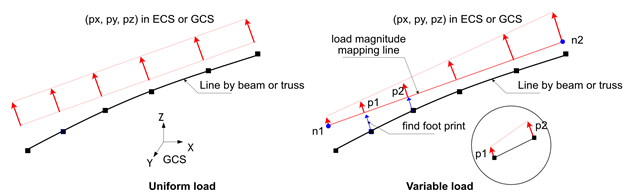
Fig. 6.2-1. Line Distributed Load
Example
*Load, Type=LineDistributed, Name=Load1
  side1, GCS, 0.,10.,1.

*Load, Type=LineDistributed Name=Load2
  side1, ECS, 1, 2, 10.,0.,0.,0,0,0, 20.,0.,0.,0,0,0

*Load, Type=LineDistributed,ECS Name=Load3
  side1, ECS, 10.
  side2, ECS, 0.,10.,1.,0,0,0
  side3, ECS, 1, 2, 10.,0.,0.,0,0,0,20.,0.,0.,0,0,0
*Load, Type=LineMoving
Moving load applied to a line composed of beam or truss elements
# Direct form : When defining the load directly
*Load, Type=LineMoving, Name=name
 speed, line1, line2, direction, s0, y0, z0
 s, y, z, Px, Py, Pz, Mx, My, Mz
 ...

# KL-510 form : When generating KL-510 loads according to design standards
*Load, Type=LineMoving, Name=name
 speed, line1, line2, direction, s0, y0, z0
 KL-510, unit, ax, ay, az{, ToDirectForm}
 lSpacing, tSpacing1, tSpacing2, ...

# DB-24, DB-18, DB-13.5 form : When generating DB-24, DB-18, DB-13.5 loads according to design standards
*Load, Type=LineMoving, Name=name
 speed, line1, line2, direction, s0, y0, z0
 DB-24|DB-18|DB-13.5, unit, ax, ay, az{, ToDirectForm}
 lSpacing, tSpacing1, tSpacing2, ...
 aSpacing1, aSpacing2, ...
First data line
- speed: Moving speed [L/T] (required)
- line1, line2: Elsets composed of beam or truss elements (line1 is required, and line2 is optional). line2 is only used in Direct form.
- direction: Moving load travel direction. Can be
forwardorbackward. Default isforward. - s0: Reference distance[L]. Defined as the distance from the start point of the target beam/truss elset. Default is 0.
- y0, z0: Initial offset in the cross-section of the beam element in the ECS [L]. Default is 0,0.
Second data line and subsequent lines for Direct form
- s: Distance from the reference point [L] (required). The load is applied at the
s0 + sdistance from the start point of the target beam/truss elset. - y, z: Additional offset in the cross-section of the beam element in the ECS [L]required). The total offset is calculated as y + y0, z + z0.
- Px, Py, Pz, Mx, My, Mz: Load vector in the GCS. Px, Py, and Pz are [F], and Mx, My, and Mz are [F*L]. If the line segment is not a beam element, Mx, My, and Mz are ignored. (optional, but more than one term should be given. default: 0,0,0,0,0,0).
Second data line for KL-510, DB-24, DB-18, DB-13.5 form
- unit: Unit used in the input file. Specify it in force-length form, such as N-m or kN-mm.
- ax, ay, az: Directional vector of the axial load in the GCS. If it is not a unit vector, it will be normalized. For example, (0,0,-1) indicates the direction opposite to gravity.
- ToDirectForm: If specified, the load is converted and saved as a Direct form.
Third data line for KL-510, DB-24, DB-18, DB-13.5 form
- lSpacing: Longitudinal spacing distance [L] between multiple transverse spacings, indicating the distance between each individual vehicle load in the direction of travel.
- tSpacing1, tSpacing2, ...: Transverse spacing distances [L]. At least one transverse spacing must be specified, and individual vehicle loads are generated at these spacings along with
lSpacing.
Fourth data line for DB-24, DB-18, DB-13.5
- aSpacing1, aSpacing2, ...: Last axle spacing vales [L]. At least one must be specified, and the value should be between 4.2-9.0m. The number of specified axle spacings determines how many moving loads are added, considering
lSpacing,tSpacing1,tSpacing2, etc.
LineMoving load specifies a moving load applied to a line composed of beam elements or truss elements. It can be defined in two main forms: Direct form and Generation form. In Direct form, the user directly specifies the axle loads that make up the moving load, while Generation form, such as KL-510, DB-24, etc., generates the moving load based on design standards.
The LineMoving load changes the position of the load according to the given speed. For dynamic analysis (*Step, Type=Dynamic) or time-dependent static analysis (*Step, Type=Static, Quasi), the position is updated based on the speed. In other analysis conditions, the position does not change (no movement in general static analysis). The line must consist only of beam elements or only of truss elements (mixing of both types is not allowed), and it must form a continuous single line.
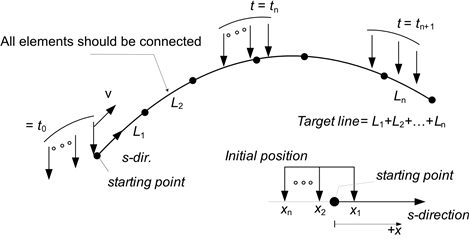
Fig. 6.2-2. Line Moving Load
For loads like railway loads that traverse two lines, two lines can be specified. In this case, the two lines must be parallel and of equal length. If two lines are specified, the given load is equally distributed (½) between each line.
For detailed explanations of the Generation forms such as KL-510, DB-24, etc., refer to *Load, TYPE=SurfaceMoving.
Example
*Load, Type=LineMoving Name=L1
  10, L1
   0., 0., 0., 0.,0.,10.
  -1., 0., 0., 0.,0.,20.
  -3., 0., 0., 0.,0.,20.

*Load, Type=LineMoving, Name=L2
  10., L1
   0.. 0., 0., 0.,0.,-10.,0.,0.,10.
  -1.. 0., 0., 0.,0.,-20.,0.,0.,20.
  -3.. 0., 0., 0.,0.,-20.,0.,0.,20.


*Load, Type=LineMoving, Name=L3
  10., L1, forward, -2, 0, 1.5
  KL-510, kN-m, 0, 0, -1
  100, -0.5, 0.5

*Load, Type=LineMoving, Name=L4
  10., L1, reverse, -3, 0, 1.5
  DB-24, kN-m, 0, 0, -1
  100, -0.5, 0.5
  4.2, 9.0
*Load, Type=SurfaceDistributed
Distributed load applied to a surface formed by elements
*Load, Type=SurfaceDistributed, Name=name, Func=timeFunction
 surface, Pressure|AcousticFlux|SeepageFlux, p, fnIdx
 surface, Pressure|AcousticFlux|SeepageFlux, n1, n2, p1, p2, fnIdx
 surface, Pressure|AcousticFlux|SeepageFlux, n1, n2, n3, p1, p2, p3, fnIdx
 surface, Pressure|AcousticFlux|SeepageFlux, n1, n2, n3, n4, p1, p2, p3, p4, fnIdx
 surface, Traction, tx, ty, tz, fnIdx
 surface, Traction, n1, n2, tx1, ty1, tx2, ty2, fnIdx
 surface, Traction, n1, n2, n3, tx1, ty1, tz1, tx2, ty2, tz2, tx3, ty3, tz3, fnIdx
 surface, Traction, n1, n2, n3, n4, tx1, ty1, tz1, tx2, ty2, tz2, tx3, ty3, tz3, tx4, ty4, tz4, fnIdx
 ...
Keyword line
- Func=timeFunction: Time function to be used for time-dependent analysis (
*Step, Type=Static, Quasiand*Step, Type=Dynamic) (optional). If the function has multiple series, the first series is used.
First data line
- surface: Target surface
- Pressure|Traction|AcousticFlux|SeepageFlux: Load type selector.
- p: Uniform scalar boundary load. If the load type is Pressure, the unit is [F/L^2]. If the load type is AcousticFlux, the unit is [F/L^3]. If the load type is SeepageFlux, the unit is [L/T].
- n1, n2, p1, p2: Applies p1 and p2 at nodes n1 and n2, respectively, and interpolates the values between them. The units of p1 and p2 are the same as p. Applicable to 2D surfaces formed by the faces of 2D solid elements.
- n1, n2, n3, p1, p2, p3: Applies p1, p2, and p3 at nodes n1, n2, and n3, respectively, and interpolates the values between them using triangular shape functions. The units of p1, p2, and p3 are the same as p. Applicable to 3D surfaces formed by the faces of 3D solid elements or shell elements.
- n1, n2, n3, n4, p1, p2, p3, p3: Applies p1, p2, p3, and p4 at nodes n1, n2, n3, and n4, respectively, and interpolates the values between them using quadrilateral shape functions. The units of p1, p2, p3, and p4 are the same as p. Applicable to 3D surfaces.
- tx, ty, tz: Uniform traction load [F/L^2]. For 2D surfaces, tz is ignored.
- n1, n2, tx1, ty1, tx2, ty2: Variable traction values [F/L^2] for 2D surfaces.
- n1, n2, n3, tx1, ty1, tz1, tx2, ty2, tz2, tx3, ty3, tz3: Variable traction values [F/L^2] for 3D surfaces with triangular interpolation.
- n1, n2, n3, tx1, ty1, tz1, ..., tx4, ty4, tz4: Variable traction values [F/L^2] for 3D surfaces with quadrilateral interpolation.
- fnIdx: Index of the time series within timeFunction (1-based index) (optional; default: 1).
This is a distributed load applied to a surface formed by the faces of elements. Surfaces can be composed of either the faces of 2D solid elements or the faces of 3D solid elements, but the two types cannot be mixed. Applicable loads include pressure, which acts in the opposite direction of the surface normal, and traction, which is defined in the GCS (Global Coordinate System).
In addition to uniform loads, variable distributed loads can also be applied. When applying variable loads, the load magnitude can be defined at the corner nodes of the mapping surface, as shown in the figure. Each element face is projected onto the mapping surface based on the integration points specified by the option *Control, NonsmoothIntegrationLevel=level, and the load magnitude is calculated and integrated accordingly. For a 4-node face, the default is to use a 5x5 grid of integration points.
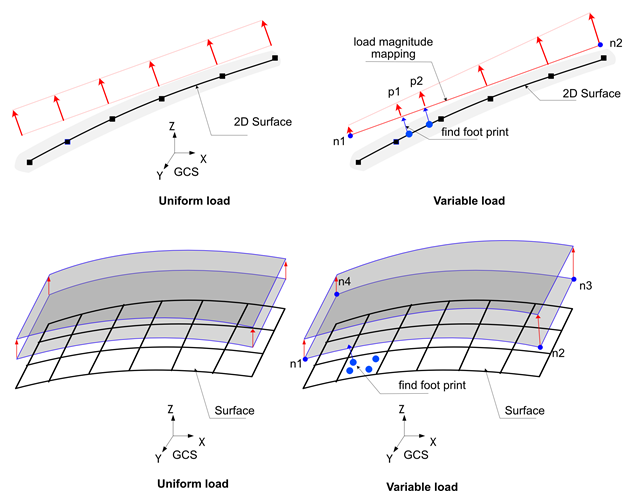
Fig. 6.2-3. Surface Distributed Load
Example
*Surface, Name=surface1
 1@slab1

*Surface, Name=surface2
 1@slab2

*Load, Type=SurfaceDistributed, Name=load1
  surface1, Pressure, 10

*Load, Type=SurfaceDistributed, Name=load2
  surface1, Pressure, 10
  surface2, Pressure, 1, 10, 11, 2, 0,0, 10, 10

*Load, Type=SurfaceDistributed, Name=flux
  surface1, SeepageFlux, 10
  surface2, SeepageFlux, 1, 10, 11, 2, 0,0, 10, 10
*Load, Type=SurfaceMoving
Moving load applied to a surface formed by elements
# Direct form : When defining the load directly
*Load, Type=SurfaceMoving, Name=name
 speed, surface, vx, vy, vz, rx, ry, rz, tol
 x, y, Px, Py, Pz
 ...

# KL-510 form : When generating KL-510 loads according to design standards
*Load, Type=SurfaceMoving, Name=name
 speed, surface, vx, vy, vz, rx, ry, rz, tol
 KL-510, unit, ax, ay, az{, ToDirectForm}
 lSpacing, tSpacing1, tSpacing2, ...

# DB-24, DB-18, DB-13.5 form : When generating DB-24, DB-18, DB-13.5 loads according to design standards
*Load, Type=SurfaceMoving, Name=name
 speed, surface, vx, vy, vz, rx, ry, rz, tol
 DB-24|DB-18|DB-13.5, unit, ax, ay, az{, ToDirectForm}
 lSpacing, tSpacing1, tSpacing2, ...
 aSpacing1, aSpacing2, ...
First data line
- speed: Moving speed [L/T]. (required)
- surface: Trget surface (required)
- vx,vy,vz: Drection of moving in global coordinate system(required). If 2D surface, vz is neglected.
- rx,ry,rz: Reference point coordinates in the GCS [L] (optional; default: 0,0,0). If the target is a 2D surface, rz is ignored.
- tol: Contact tolerance [L] (optional; default: 1E-4 in the current model coordinate unit).
Second data line and subsequent lines for Direct form
- x,y: Offset coordinates in the local plane with the current reference point as the origin [L]. If the target is a 2D surface, y is ignored.
- Px,Py,Pz: Offset coordinates in the local plane with the current reference point as the origin [L]. If the target is a 2D surface, y is ignored.
Second data line for KL-510, DB-24, DB-18, DB-13.5 form
- unit: Unit used in the input file. Specify it in force-length form, such as N-m or kN-mm.
- ax, ay, az: Directional vector of axial load in the GCS. If it is not a unit vector, it will be normalized. For example, (0,0,-1) indicates the direction opposite to gravity.
- ToDirectForm: If specified, the load is converted and saved as a Direct form.
Third data line for KL-510, DB-24, DB-18, DB-13.5 form
- lSpacing: Longitudinal spacing distance between multiple transverse spacings [L], indicating the distance between each individual vehicle load in the direction of travel.
- tSpacing1, tSpacing2, ...: Transverse spacing distances [L]. At least one transverse spacing must be specified, and individual vehicle loads are generated at these spacings along with
lSpacing.
Fourth data line for DB-24, DB-18, DB-13.5
- aSpacing1, aSpacing2, ...: Last axle spacing values [L]. At least one must be specified, and the value should be between 4.2-9.0m. The number of specified axle spacings determines how many moving loads are added, considering
lSpacing,tSpacing1,tSpacing2, etc.
This defines a moving load applied to a surface formed by the faces of elements. The moving load changes its position based on the given speed. For dynamic analysis (*Step, Type=Dynamic) or time-dependent static analysis (*Step, Type=Static, Quasi), the position is updated according to the speed. In other analysis conditions, the position does not change (no movement in general static analysis).
The SurfaceMoving load can be defined in two main forms: Direct form and Generation form. In Direct form, the user directly specifies the axle loads that constitute the moving load, and it can be defined on both 3D and 2D surfaces.
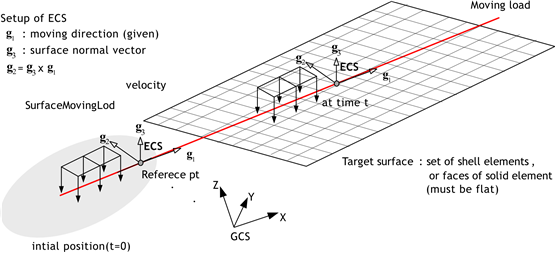
Fig. 6.2-4. Moving Load on 3D Surface
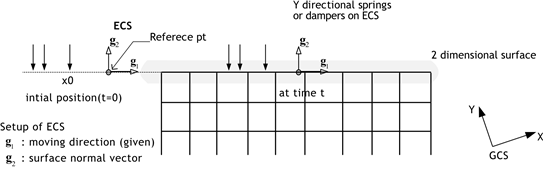
Fig. 6.2-5. Moving Load on 2D Surface
Generation form is used to generate axle loads based on a few parameters, supporting standard truck loads defined by design codes such as KL-510, DB-24, DB-18, and DB-13.5. This form is only applicable to 3D surfaces formed by 3D solid elements or shell elements. Internally, it is converted to a Direct form. To verify the converted axle loads, set the ToDirectForm option.
KL-510 load is defined in the Road Bridge Design Code Limit State Design Method (KDS 24 12 21), while the three types of DB loads (DB-24, DB-18, DB-13.5) are vehicle loads used in road bridge design codes before 2010. Internally, these are generated as axle loads in the same format as Direct form by considering unit, lSpacing, tSpacing1, tSpacing2, ..., aSpacing1, aSpacing2, .... unit is specified as the unit used in the input file, in the force-length format such as N-m, kN-mm, etc. The available units are as follows:
- force: N, kN, tonf, kgf, lb, kip
- length: m, mm, cm, in, ft
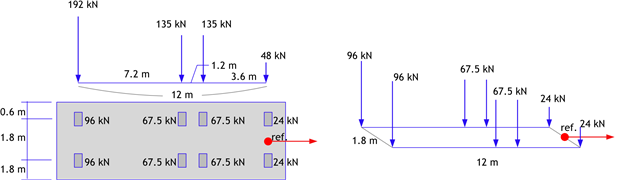
Fig. 6.2-6. KL-510 Moving Load
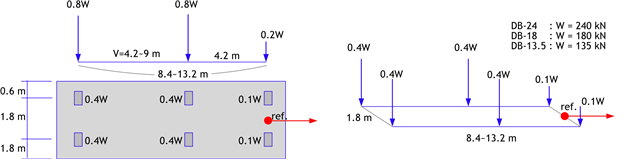
Fig. 6.2-7. DB-24, DB-18, DB-13.5 Moving Load
lSpacing is the longitudinal spacing of vehicles in the direction of travel, while tSpacing1, tSpacing2, ... are transverse spacing distances. For KL-510 loads, if tSpacing1 and tSpacing2 are specified, the loads are generated as shown in the figure below. A load group corresponding to one vehicle is generated at a position offset by tSpacing1 transversely. Subsequently, a load group corresponding to one vehicle is generated again at a longitudinal distance offset by lSpacing and a transverse distance offset by tSpacing2. In other words, as many vehicle loads as specified by tSpacing# are generated at a distance of lSpacing. This allows the definition of the effect of vehicle separation within a lane as a single moving load. When specifying lSpacing, set it as "bridge length + truck length" to prevent two vehicles from simultaneously entering the bridge.

Fig. 6.2-8. KL-510 Load Based on Longitudinal and Lateral Spacing of Vehicle Movement Direction
For DB loads, the distance between the last axles must be analyzed by varying it between 4.2-9m. Similar to specifying tSpacing#, as many axle loads as specified by lSpacing are generated at each longitudinal distance.
For the Generation form, the length required for analysis (the length required for the vehicle to completely pass over the bridge) is calculated using the following criteria:
- lSpacing: Bridge length + Length of one vehicle
- Required analysis length:
Number of tSpacing * Number of aSpacing * lSpacing(KL-510 omits the number of aSpacings)
The analysis time for *Step, Type=Static, Quasi can be determined considering speed to ensure that the required analysis length is fully covered.
Example
*Surface, Name=surf
 1@upperface

*Load, Type=SurfaceMoving, Name=L1
  10, surf, 1., 0., 0, 1., 0. , 0.
   0. 0. 10. 0. 0.
  -1. 0. 20. 0. 0.
  -3. 0. 20. 0. 0.
  -0.5, +0.5, 0.

*Load, Type=SurfaceMoving, Name=L2
  10, surf, 1., 0., 0, 1. 0. 0.
  KL-510, kN-m, 0, 0, -1
  100, -0.5, 0.5

*Load, Type=SurfaceMoving, Name=L3
  10, surf, 1., 0., 0, 1. 0. 0.
  DB-24, kN-m, 0, 0, -1
  100, -0.5, 0.5
  4.2, 9.0

*Step, Type=Static, Quasi, Name=LL
 , 1, 29
*Activate, TYPE=Element
 slab
*Activate, TYPE=Constraint
 support
*Activate, TYPE=Load
 L1
...
*Load, Type=PedestrianMoving
Pedestrian load applied to a surface formed by elements
*Load, Type=PedestrianMoving, Name=Moving
 surface, vx, vy, vz, rx, ry, rz, tol
 interval, stride
 SINE, Wx,Wy,Wz,F/W,contactDuration
First data line and subsequent data lines
- surface: target surface (required)
- vx,vy,vz: direction of moving in global coordinate system(required)
- rx ry rz: Reference point coordinates in the GCS [L] (optional; default: 0,0,0).
- tol: contact tolerance (optional, default 1E-4)
Second data line
- interval: interval
- stride: stride
3rd data line
- SINE: means sine function
- Wx, Wy, Wz: Weight
- F/W: F/W ratio
- contactDuration: contact duration
Example
*Surface, Name=L1
 upperface 1             # element_set iface

*Load, Type=PedestrianMoving, Name=Moving
 surf, 0.591, 0, -0.377, -15.6425,-.138,9.9655   # surf, vx, vy, vz, rx, ry, rz
 0.5,0.7                    # interval, stride
 SINE,0,-700,0,2,0.02       # type,Wx,Wy,Wz,F/W,contactDuration
*Load, Type=FreeFieldSeismic [Experimental]
Free-field load for layered ground in soil-structure interaction seismic analysis.
*Load, TYPE=FreeFieldSeismic, Name=name, Func=acc
 {DRM,surface,nset}|{Prescribed, nset}
 RigidBedrock|ElasticBedrock, Direct|Outcrop, iLayer
 rcx, rcy, x0, y0, top
 E, nu, density, xi, h, n
 ...
Keyword line
- acceleration: Acceleration time-history function [L/T^2]. It shall be a TimeSeries function. It shall have two components for 2D analysis and three components for 3D analysis.
First data line
- DRM, surface, nset: Applies the effective load used in the Domain Reduction Method (DRM). surface is the boundary surface on which the effective load acts. nset is the node set on which displacement, velocity, and acceleration are prescribed when a rigid bedrock condition is used. If surface or nset is specified but does not exist, an empty surface or node set is created automatically.
- Precribed, nset: Applies ground motion directly in the form of prescribed displacement, velocity, and acceleration. nset is the node set to which the motion is applied. If it is specified but does not exist, an empty node set is created automatically.
Second data line
- RigidBedrock|ElasticBedrock: Specifies the rigid bedrock or elastic bedrock (elastic halfspace) condition. For RigidBedrock, nset in DRM, surface, nset shall be specified. For ElasticBedrock, nset shall not exist. If ElasticBedrock is specified, the last layer represents the elastic bedrock, and its height (hn) shall be an arbitrary sufficiently large value for 1D wave-propagation analysis.
- Direct|Outcrop, iLayer: Specifies the input type and the layer-interface index (1-based) at which the time history is applied. If Direct is specified, the input is treated as a directly given acceleration history. If Outcrop is specified, it is treated as outcrop motion. If iLayer=1, only Direct is allowed. For RigidBedrock, iLayer may be specified up to '(number of layers)+1', but when it is specified as the bottommost '(number of layers)+1', only Direct is allowed. For ElasticBedrock, iLayer may be specified up to '(number of layers)'.
Third data line
- rcx, rcy: Reciprocals of the apparent horizontal propagation velocities of the incident seismic wave [T/L]. rcx=1/cx and rcy=1/cy, where cx=cp/lx=cs/mx and cy=cp/ly=cs/my. Here, cp and cs are the P-wave and S-wave velocities, and (lx, ly, lz) and (mx, my, mz) are the unit direction vectors of the P-wave and S-wave, respectively. rcx and rcy are used instead of cx and cy because the direction cosines lx, mx, ly, and my may become zero. If rcx=rcy=0, vertical incidence is assumed.
- x0, y0, top: Reference point of the incident seismic wave and the position of the ground surface [L].
Fourth data line and subsequent data lines
- E, nu, density, xi, h, n: Young's modulus, Poisson's ratio, mass density, damping ratio, layer thickness, and the number of elements in the vertical direction for the layered ground measured from the ground surface. E is [F/L^2], nu is dimensionless, density is [F*T2/L4], xi is dimensionless, h is [L], and n is a dimensionless integer. If ElasticBedrock is specified, the last layer shall be assigned an arbitrary sufficiently large depth for 1D wave-propagation analysis.